One DevTools panel. tracking platforms.
Debug your whole MarTech stack in real time: every event, consent state, GTM container, and script dependency, right inside Chrome DevTools.
- 100% free
- Runs locally in your browser
- No account required
- You choose where it runs
Detected automatically. Browse by category.
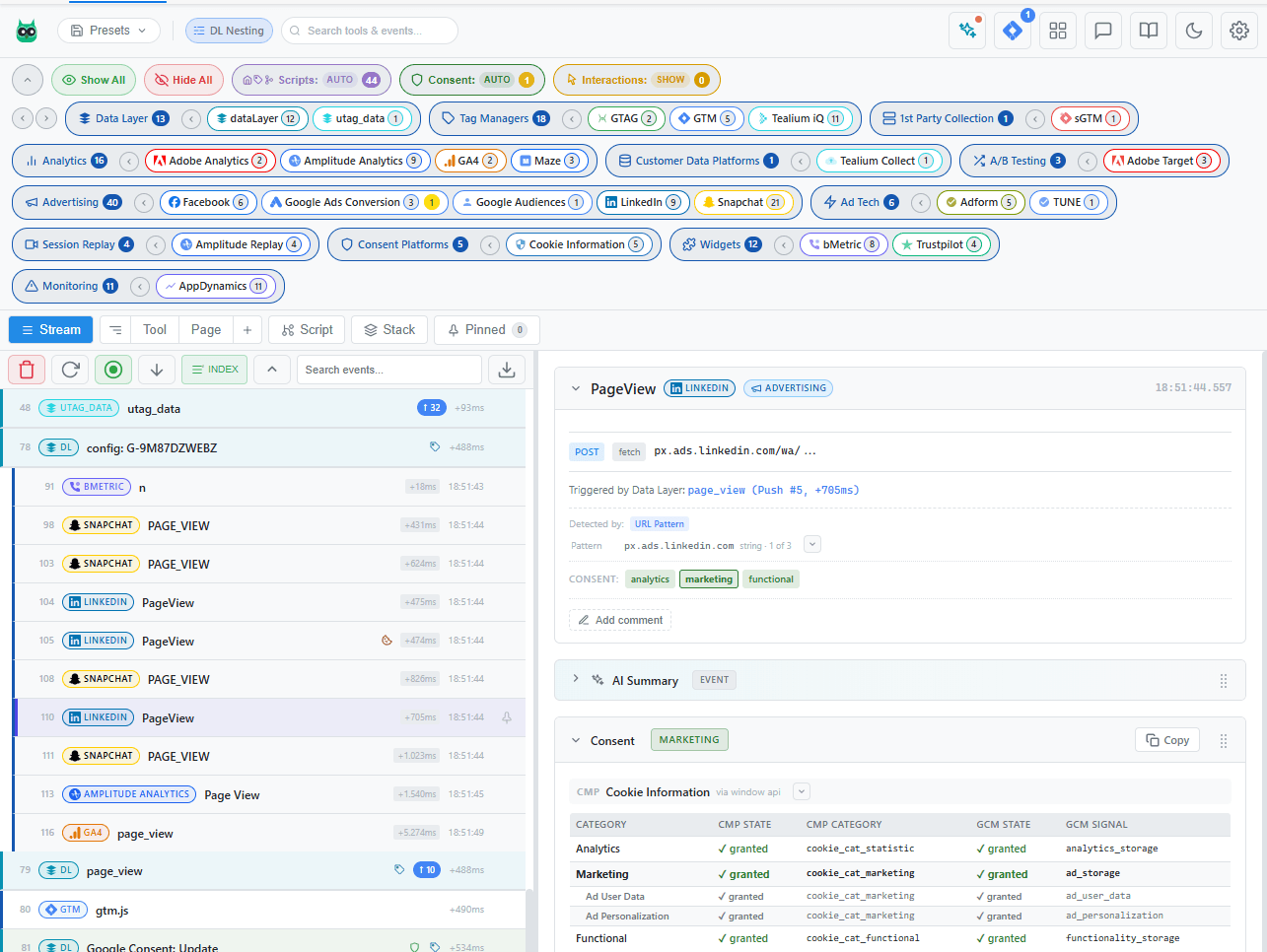
Everything you need to debug tracking
One DevTools panel replaces dozens of browser extensions, console scripts, and network tab filters.
600+ Platform Recognition
Automatically identifies GA4, Adobe Analytics, Meta Pixel, TikTok, Criteo, Segment, and hundreds more with color-coded badges.
Consent Monitoring
Every tracking event cross-referenced against the visitor's live consent state. CMPs detected automatically, granted and denied categories mapped, and violations flagged: events firing without required marketing or analytics consent.
GTM Hub
Preview, block, or swap GTM containers on any site. Test tag changes in production without publishing: swap a staging container in or block a live one, with per-site rules that live only as long as you choose, from this DevTools session to always.
Script Dependency Tree
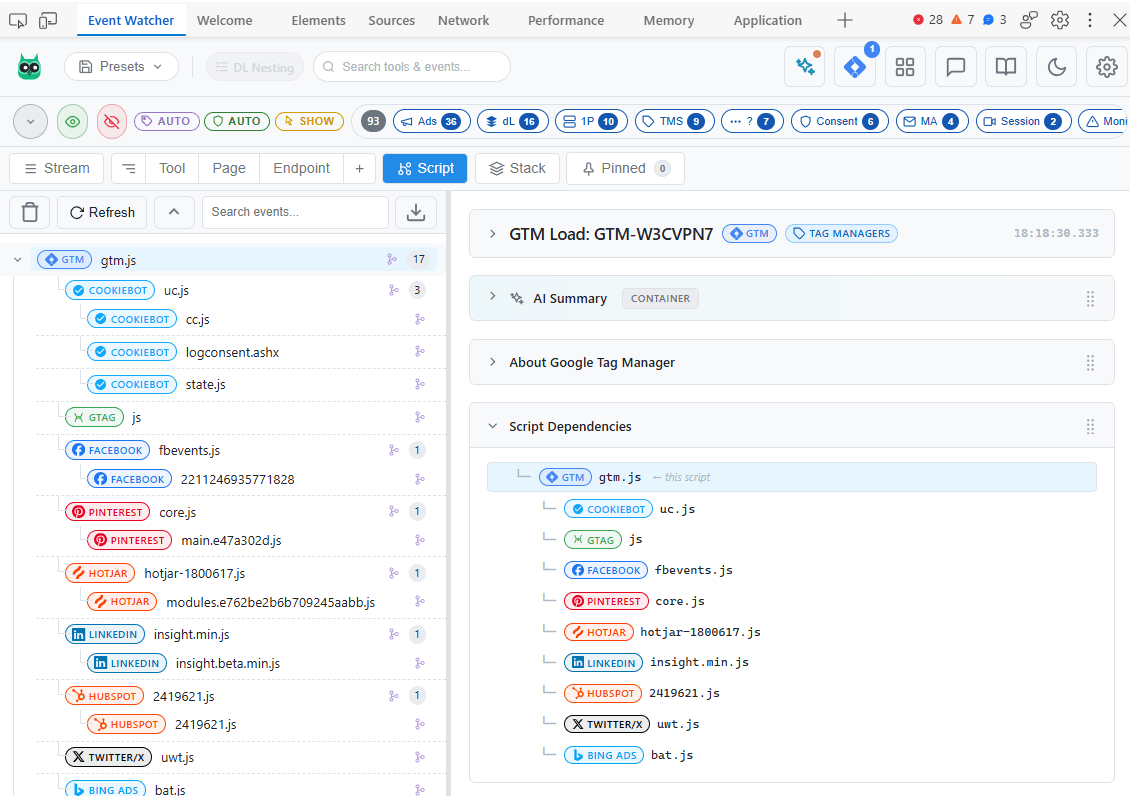
Visualize which scripts loaded which other scripts. Trace the full loading chain from page to tag manager to tracking pixel.
AI-Ready Export & Insights
Copy events formatted for humans or size-budgeted for AI chats, or turn on optional AI summaries and session-wide chat, powered by your own Anthropic, OpenAI, or Gemini key, never a server of ours.
Privacy First
All event processing happens locally in your browser, and you choose where it runs: skip a site in one click, or watch only while the panel is open. No account or sign-up, the URLs you visit are never collected, and the optional usage analytics is one click to turn off.
What are you debugging?
Step-by-step guides for the questions that bring people to DevTools.
How to check if GA4 fires before consent is given
Use Event Watcher's consent cross-referencing to see whether Google Analytics 4 sends hits before the visitor accepts the cookie banner, and what those hits contain.
How to debug Google Consent Mode v2
Inspect the consent state Google tags actually receive: default and update commands, ad_storage / analytics_storage signals, and how they differ from what your CMP believes.
How to find out which script pushed an event to the dataLayer
Every dataLayer.push has an author: the site, the tag manager, or a third-party script. Event Watcher attributes each push so you can find the source of mystery events.
How to preview or swap a GTM container without publishing
Test a Google Tag Manager container against any live page: block the production container or swap in another one, straight from DevTools, without publishing.
How to audit every tracking pixel on a page in one view
See every tracking platform a page loads (named, categorized, and consent-checked) instead of scrolling through raw DevTools network requests.
All guidesOr jump straight to a platform
Endpoints, key parameters, and consent behavior for the tools you debug most.
Loved on the Chrome Web Store
5.0rating on the Chrome Web Store555weekly usersChrome Web Store numbers as of August 2026.
“Event Watcher is a powerful extension that makes my QA work much easier and despite the extensive list of features it packs, the interface is very well designed for clarity. […] It makes other extensions unnecessary, as it supports so many vendors and platforms. […] Everything you need in one place.”
600+ supported platforms
Every analytics, advertising, and MarTech tool Event Watcher recognizes out of the box, across 14 categories. If it sends a network request, it shows up in your DevTools with a name, an icon, and a category badge.
Platform list as of Event Watcher v1.5.0. New platforms ship in nearly every release.
Per-platform debugging guides
In-depth pages for the 82 most-used platforms: endpoints, key parameters, consent behavior, and common debugging scenarios.
 AB Tasty
 ActiveCampaign
 Adobe Analytics
 Adobe Audience Manager
 Adobe Data Layer
 Adobe Experience Platform
 Adobe Tags (Launch)
 Adobe Target
 Amplitude Analytics
 Bing Ads
- Bloomreach
 Braze
Braze- Brightcove
 ContentSquare
 Convert
 Cookiebot
 CookieYes
 Crazy Egg
 Criteo
 Customer.io
 Datadog RUM
 dataLayer
 Didomi
 Disqus
 Drift
Drift Facebook
 FullStory
 Google Ads Conversion
 Google AdSense
 Google Analytics 4
 Google Consent Mode
 Google Tag
 Google Tag Manager
 Heap Analytics
 Hotjar
 HubSpot
 Intercom
 Kameleoon
 Klaviyo
 LinkedIn
 LogRocket
 Mailchimp
 Mapbox
 Matomo/Piwik
 Microsoft Clarity
 Mixpanel
 Mouseflow
 mParticle
 OneTrust
 Optimizely
 Piano Analytics
 Pinterest
 Piwik Pro Analytics
 PostHog Analytics
- Prebid.js
 Quantcast Choice
 Reddit
 RudderStack
 Salesforce Data Cloud
 Salesforce Marketing
 Segment
 Sentry
 sGTM
sGTM Smartlook
 Snapchat
 Snowplow
 Sourcepoint
 Spotify
 Taboola
 Tealium Collect
 Tealium iQ
 TikTok
 TrustArc
 Trustpilot
 Twitter/X
 Usercentrics
- Vidyard
 Vimeo
Vimeo VWO
VWO Wistia
 YouTube Stats
 Zendesk
Missing a platform?
Event Watcher still captures unrecognized tracking requests, you can map custom endpoints yourself, or report a missing tool straight from the panel. Most requests ship in the next release.
See it in action
Five view modes on the same captured session. Switch to the perspective the task at hand needs, right inside Chrome DevTools.
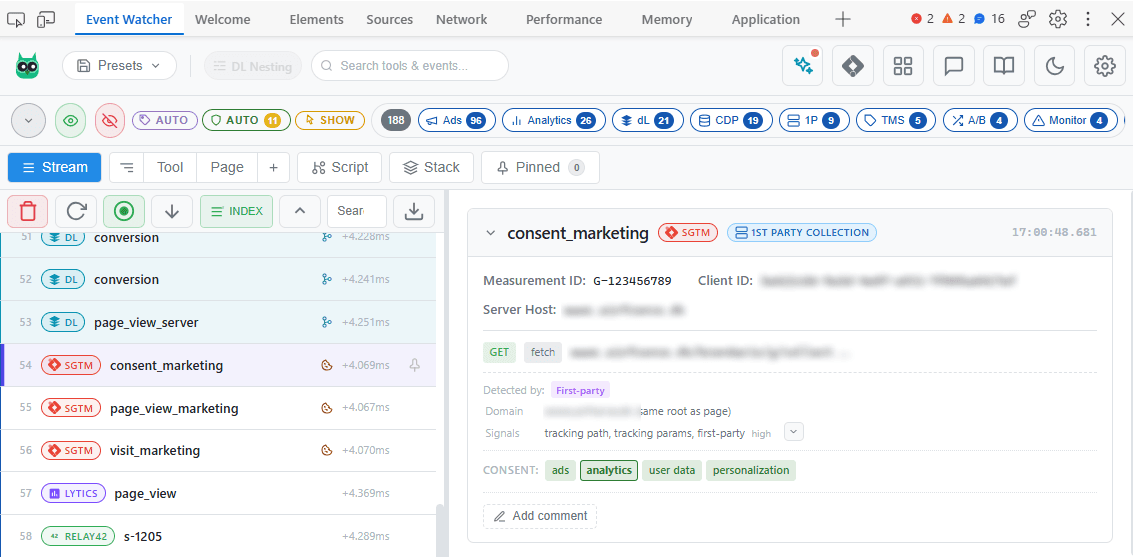
Stream View
The default real-time timeline: network requests, dataLayer pushes, and script loads appear the instant they fire, with platform badges and source indicators.
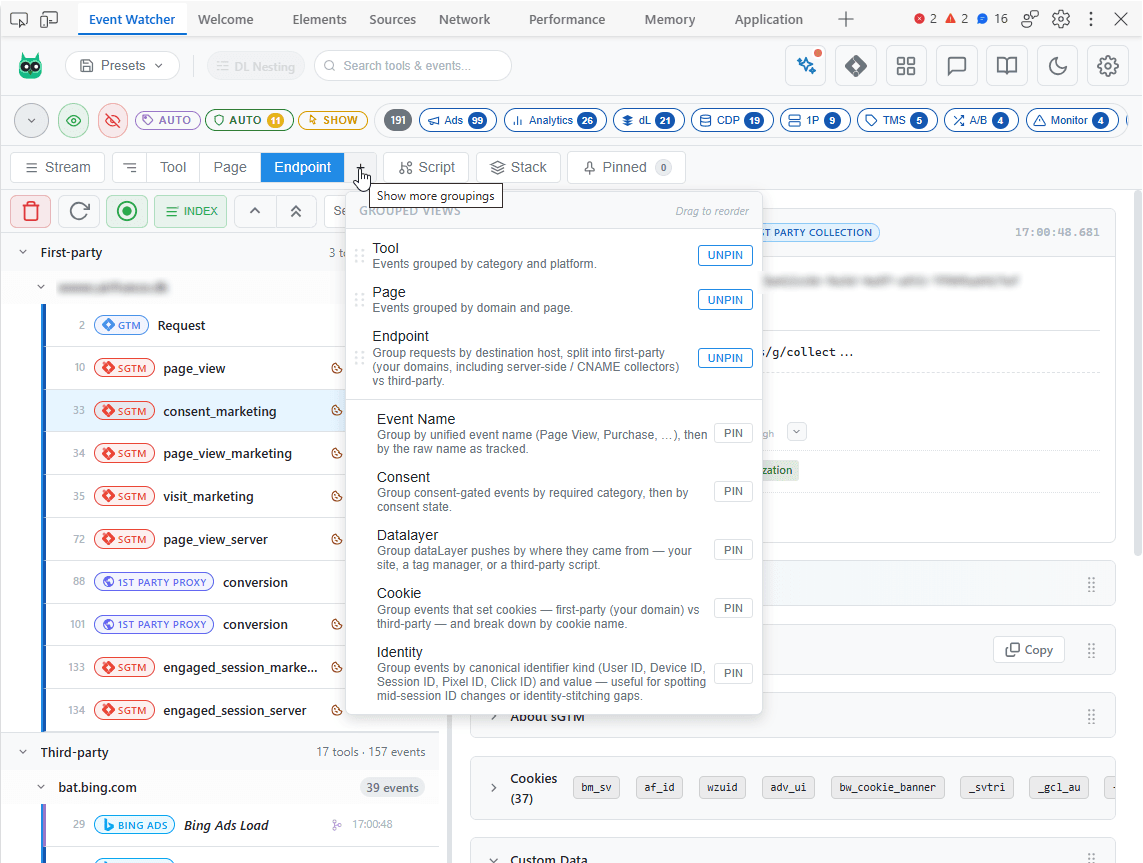
Grouped View
Pivot the same captured events eight ways (by Tool, Page, Event Name, Consent Category, dataLayer, Endpoint, Cookie, or Identity) without re-capturing.
Script Tree View
The full script loading chain: which scripts loaded which other scripts, from the initial page load through tag managers to individual tracking pixels.
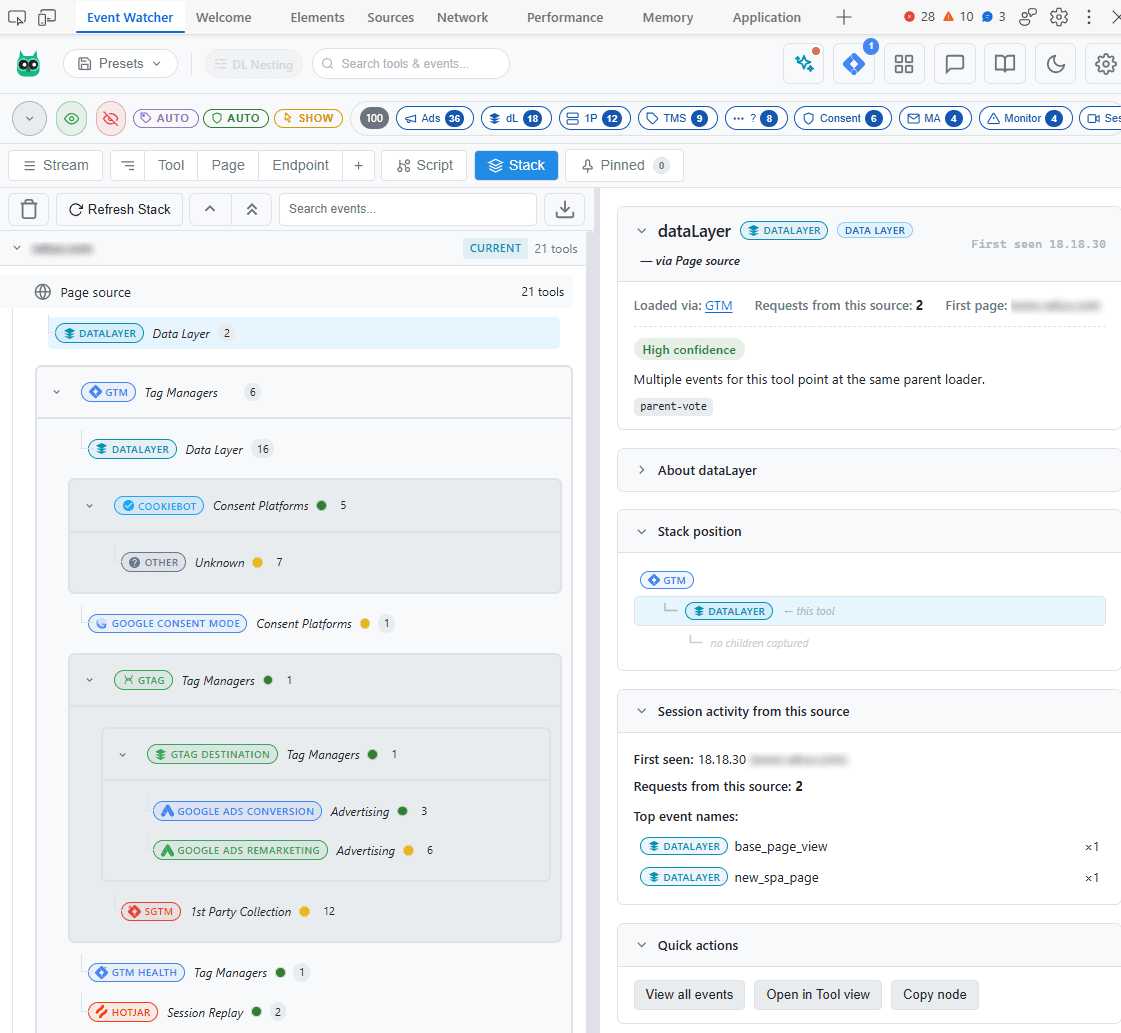
Stack View
The site's whole MarTech stack as a tree (page → tag manager → vendor tools), with attribution-confidence dots and export to Markdown, Mermaid, or SVG.
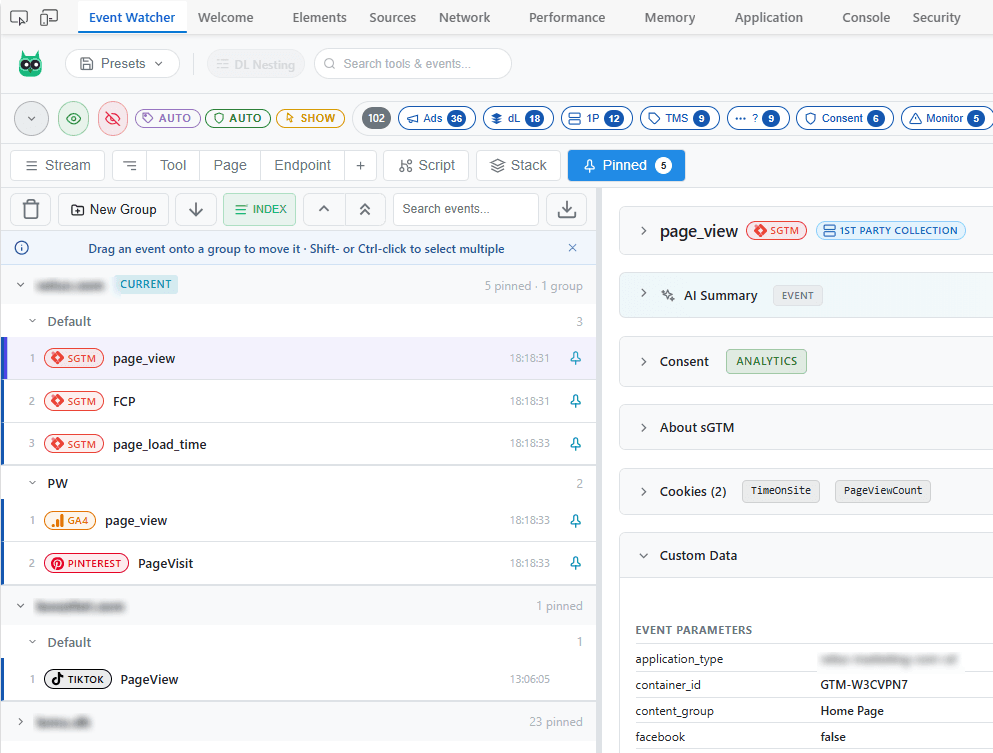
Pinned View
A per-domain parking spot where pinned events survive Clear and page reloads, with per-pin notes and groups to organize an investigation in place.
AI Insights · Bring your own key
Let AI read the stack for you
Turn a wall of raw tracking calls into something you can reason about, without leaving DevTools. Optional, off by default, and powered by a key you control: pick a provider and a level (Fast, Balanced, or Capable) and Event Watcher follows that provider's current model.
Event summaries
A plain-English read of any event: what it is, what it's tracking, and whether anything looks off.
Session-wide chat
Ask questions across everything you captured. “Which events fired before consent?” Answered.
Identify unknowns
One click to name an unrecognized tool from the shape of its request.
Requests go straight from your browser to the provider you choose. There is no Event Watcher server or proxy in the path, and nothing is logged. PII redaction is on by default.
This is a GA4 purchase event firing after checkout completes.
- •Sends
value(128.0),currency(EUR) and 3 items. - Fired after analytics consent was granted.
ad_user_datais denied, so the Ads conversion may not register.

Integration
Built to hand off to MartechStack Builder
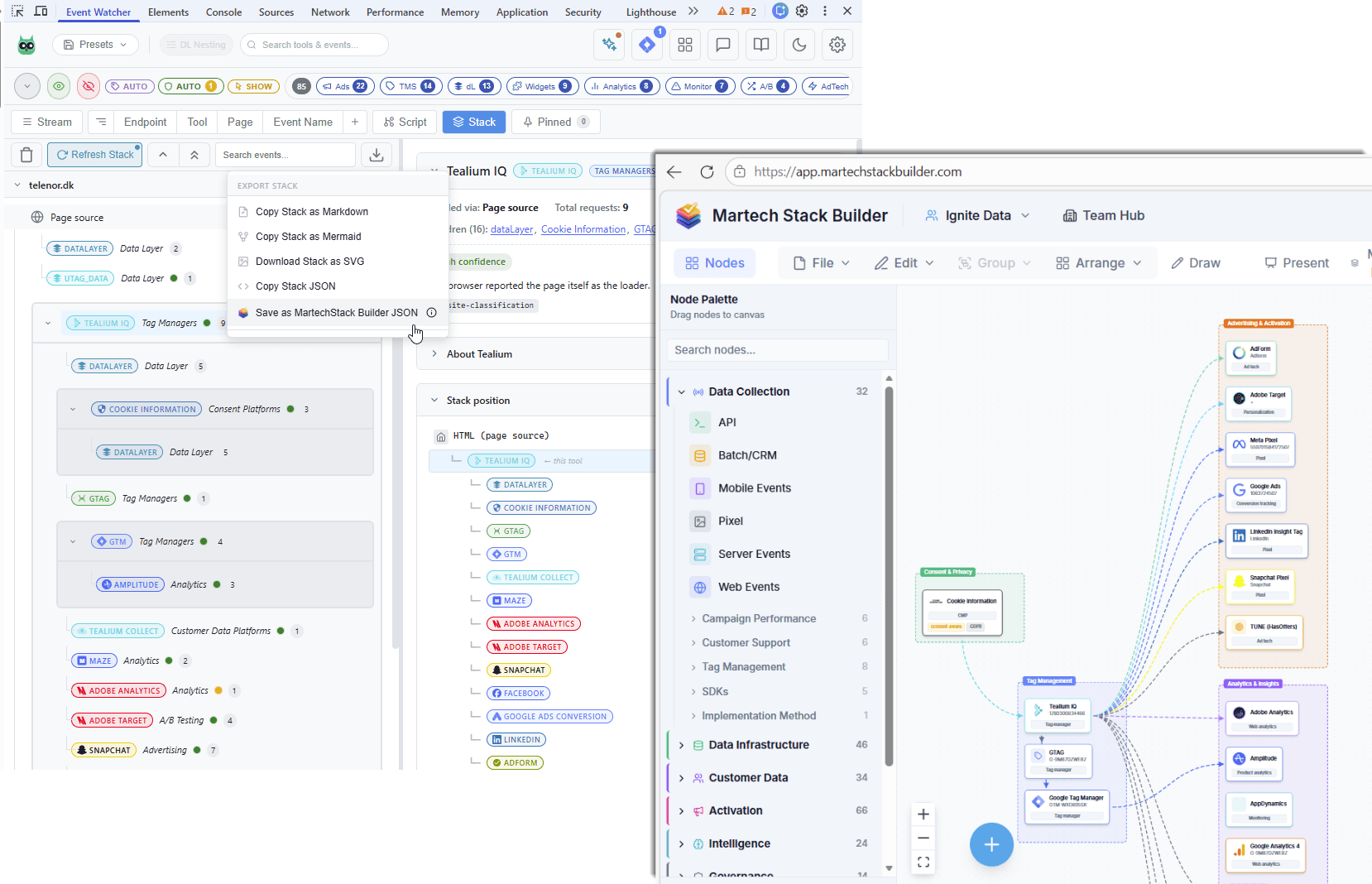
Event Watcher's Stack view captures a site's livemartech stack: every platform that's actually loaded, and how it's wired together (page → tag manager → vendor tools). One click exports that as MartechStack Builder JSON.
Open it in MartechStack Builder (a tool for designing and visualizing martech stacks) via File → Import JSON, and what Event Watcher discovered becomes an editable diagram you can share, present, or hand to a client.
- Vendor logos, brand colours, and capability metadata auto-attach on import
- Nodes arrive pre-categorized, with the page → tag manager → tool relationships intact
- Goes from a live capture to a shareable stack diagram in a few clicks
Event Watcher is listed in MartechStack Builder's integrations directory.
Start debugging smarter today
Install in seconds, open DevTools, and see every tracking event on any page.
Add to ChromeFree on the Chrome Web Store